The battery that falls off a cliff, part 3: two new modules
A Raspberry Pi put every Dyness cell into Home Assistant and caught two weak cells under load, Dyness UK agreed to replace two modules, and tonight the new pair went into the rack.
Part 2 ended with the evidence sent to Dyness UK, no reply, and a to-do list. The second item on it was to put per-cell data into Home Assistant.
The problem: watching it from a dashboard, not a CSV
Until 10 October, every cell reading came from a script on a Mac, written to CSV, and looked at the next morning. That proved the fault, but it wasn’t something I could leave running, and nothing would tell me when a cell started to run away.
dyness-b3-bms-mqtt
I asked Claude Code to turn the overnight logger into a service for a Raspberry Pi Zero 2 W that publishes to MQTT, with Home Assistant discovery so every value turns up as an entity. It worked from the afternoon of 9 October into the 10th, and v0.1.0 to v0.3.0 were all released on 10 October. It’s public: github.com/gsdevme/dyness-b3-bms-mqtt.
The Pi uses the same £20 USB-CAN adapter from part 1, on the Linux kernel’s gs_usb driver, as can0 at 500 kbit/s. It hangs off the spare OUT port of the module at the end of the chain, so the inverter’s link to the master is untouched. The service polls each module once at start, then listens, and publishes every value about every 10 seconds: 15 cell voltages per module, min and max cell and spread, temperatures, SOC (state of charge), SOH (state of health), cycles, lifetime energy, current limits and the BMS (battery management system) flags.
What came back was a written spec with numbered requirements, tests against a simulated stack, a systemd unit with a watchdog, and a recovery ladder that reopens the bus, then bounces the can0 link, then resets the USB adapter. Running it on the real stack found three things the tests hadn’t:
- The adapter refuses
restart-ms. The helper that bringscan0up passed it, the adapter answered “Device doesn’t support restart from Bus Off”, and the whole link set-up failed. Fixed in v0.2.0 by retrying without it. - Nothing in the journal at boot. When udev ran that helper, its log lines went nowhere. Fixed in v0.3.0.
- The USB reset step could never work. It passed
usbreseta device path, which usbutils’usbresetdoesn’t accept. A fallback that toggles the device’sauthorizedflag in sysfs was doing the actual reset. The fix for that is on a branch and not yet released.
The hardware acceptance run on 10 October was a partial one; about half the checklist is still to do.
Shut the Pi down with
sudo poweroffbefore pulling its power. Two hard power-offs during testing triggered a filesystem clean-up on the SD card and lost the Pi’s wifi profile.
The evidence: two cells below 3 V
Home Assistant logged every cell from 12 October 18:16 to 14 October 15:17. In that window there was one heavy discharge: on 12 October at 19:10 the house pulled about 3 kW for under a minute.
Module 2’s cell 8 fell to 2.958 V and module 3’s cell 9 to 2.971 V. No other cell in either module went below 3.08 V; the lowest of the rest were 3.084 V in module 2 and 3.100 V in module 3.
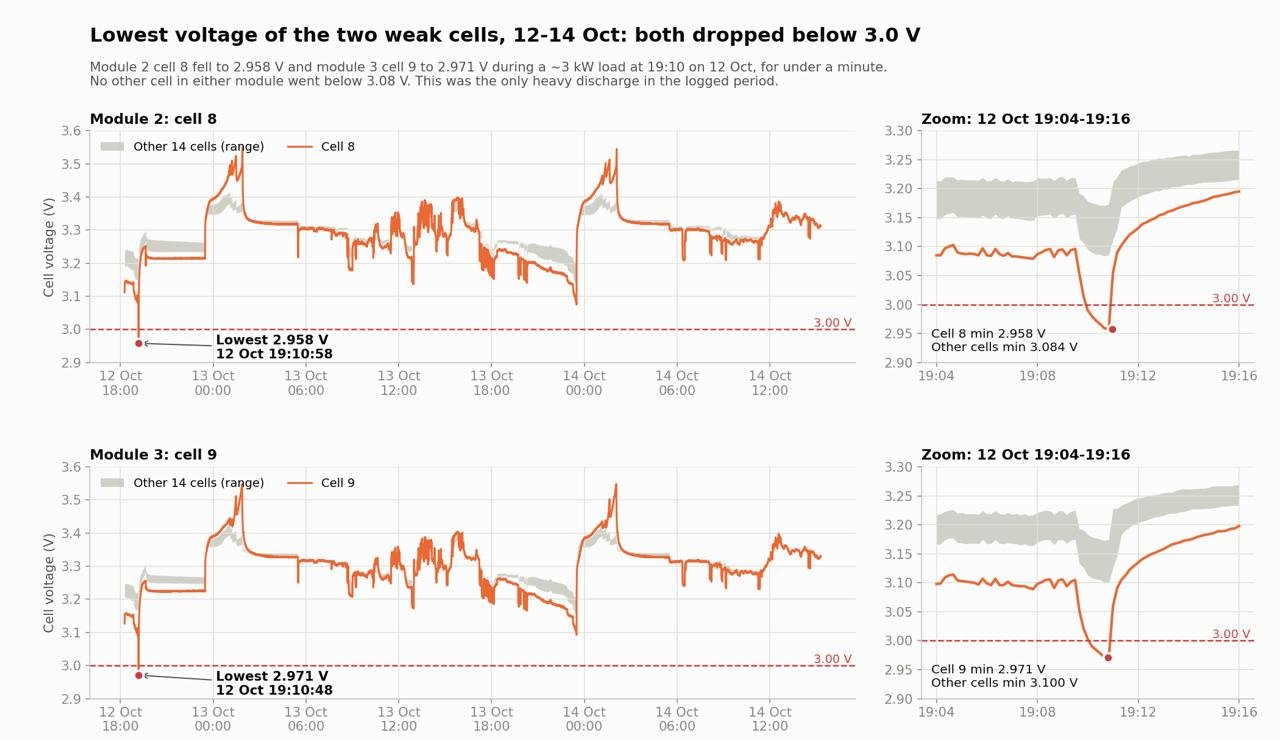
Part 2 showed that a module re-zeroes its SOC when a cell sags to 2.95 V. Both weak cells came within 21 mV of that line in under a minute.
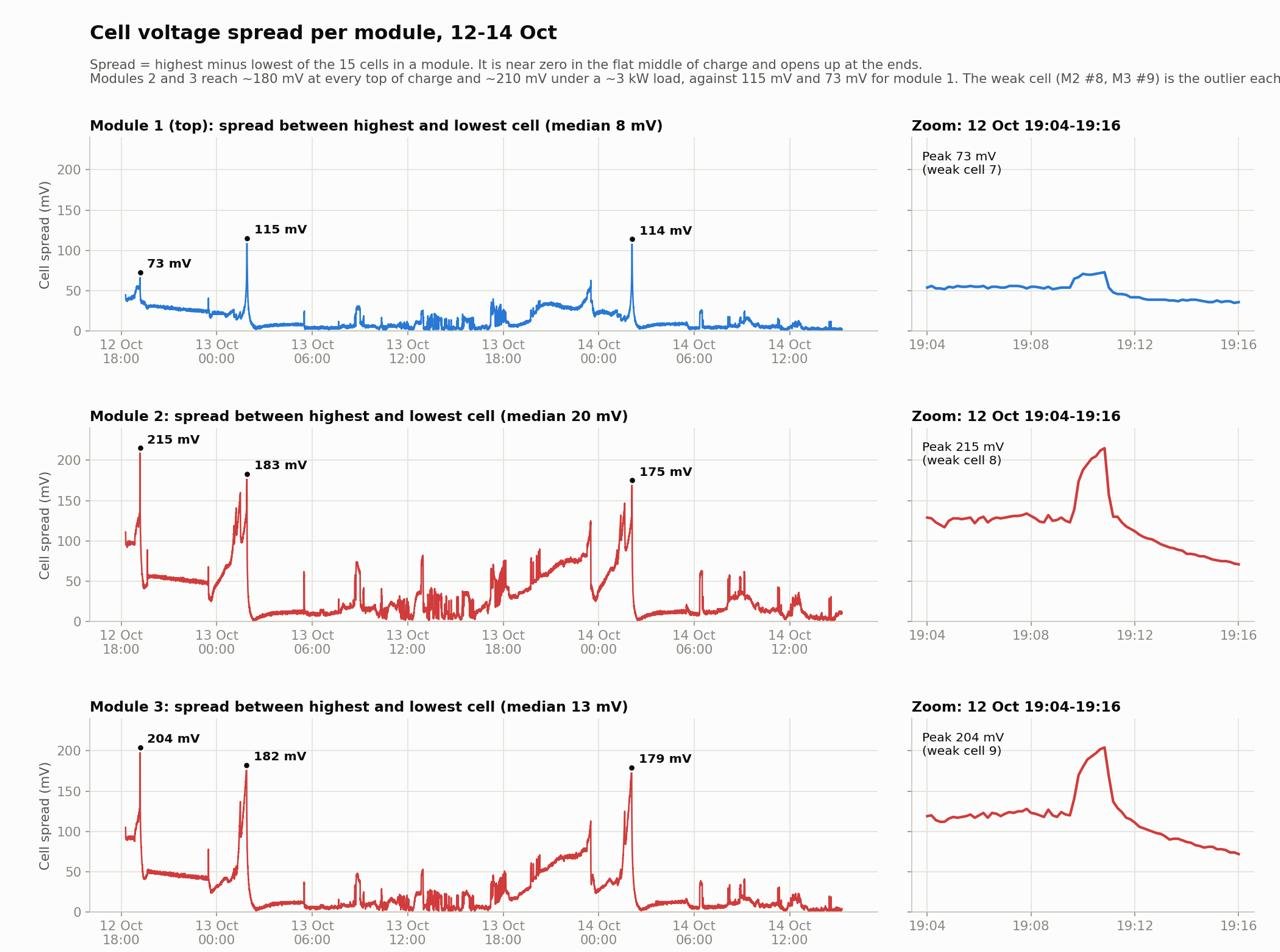
The spread, highest cell minus lowest of the 15 in each module, told the same story over the whole period:
| Module | Spread peaks (mV) | Median spread (mV) |
|---|---|---|
| 1 | 73, 115, 114 | 8 |
| 2 | 215, 183, 175 | 20 |
| 3 | 204, 182, 179 | 13 |
Modules 2 and 3 reach about 180 mV at every top of charge and about 210 mV under that 3 kW load. Module 1 has a weak cell too, cell 7, but at nothing like that size.
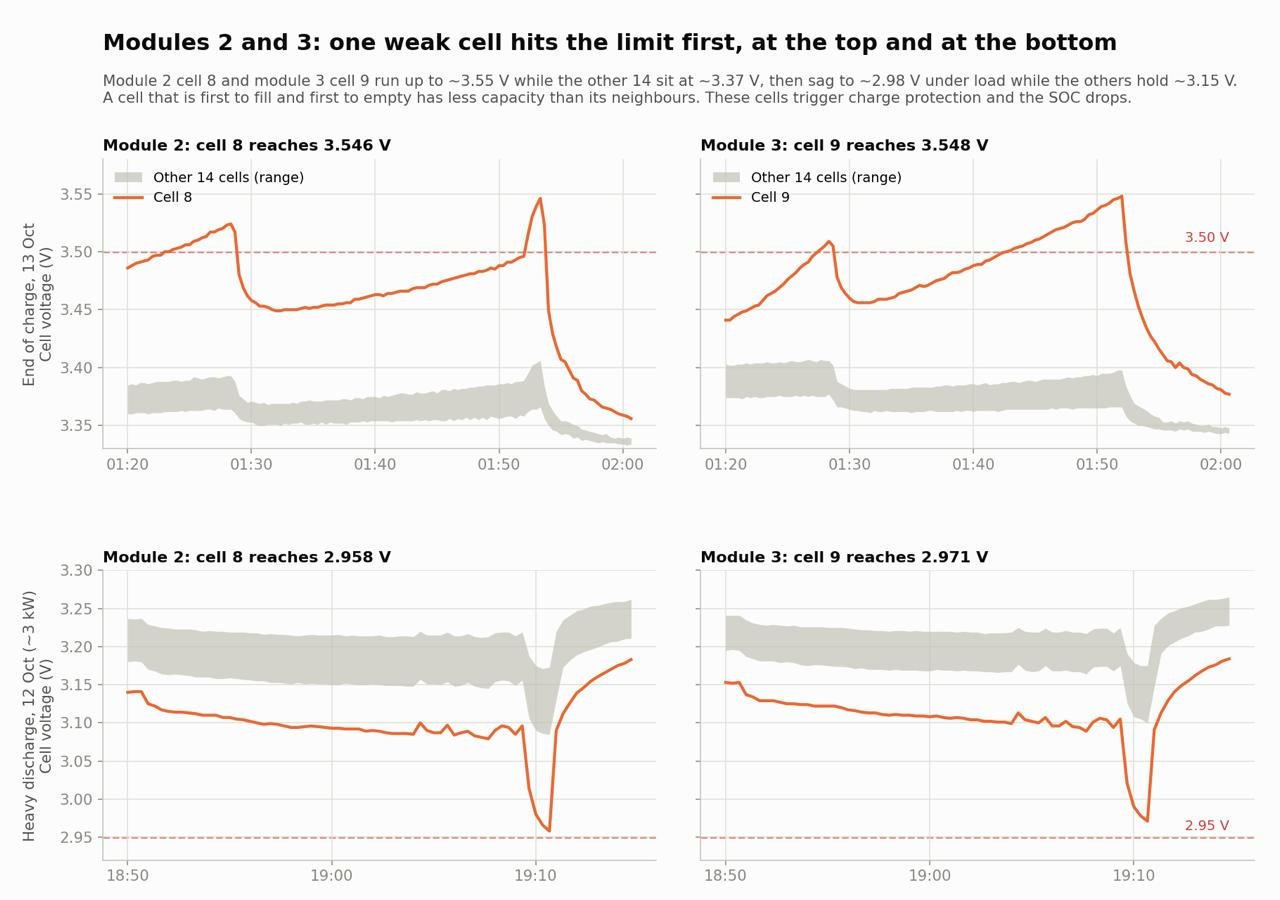
The third chart puts both ends of the charge next to each other. At the end of the charge on 13 October at about 01:52, module 2’s cell 8 reached 3.546 V and module 3’s cell 9 3.548 V, while the other 14 cells in each sat at about 3.37 V. Under the 3 kW load the evening before, the same two cells sagged to 2.958 V and 2.971 V while the others held about 3.15 V. A cell that is first to fill and first to empty has less capacity than its neighbours.
Getting hold of Dyness
The email on 9 October got no reply. For the next week I tried several ways of reaching them, mostly Facebook, Twitter and WhatsApp. Then I found the ticket portal Dyness use, in their app, which opens a work order. That produced a work order on 14 October and a phone call on the morning of 16 October.
Straight after the call, the WhatsApp chat with Dyness UK technical support opened and I sent two videos and the charts above. Within about four minutes of the chat opening, the reply was:
Module 2 and 3 definitely need a replacement
They asked for the serial number stickers. Those are on the side of the modules, so reading them would have meant disconnecting and pulling them out of the rack; I sent the serials from the registration certificate instead. A new work order was opened that referenced the first one. I pointed out that cell 8 in module 2 and cell 9 in module 3 were dragging their modules down, with spreads over 200 mV, and that module 1 had a slightly weak cell but nothing like those. The reply to that was:
You are a legend, thank you so much for providing such detailed checks
I raised the obvious worry: two new modules next to a four-year-old one could be out of balance. Their view was that module 1’s difference wasn’t big, though it was getting closer to the limit, so they would replace two now, and if the third went the same way they would replace that one after. I agreed. The replacement reference came 21 minutes after the chat opened.
On 23 October they said the modules would be dispatched on the 26th. I asked how the faulty pair would get back to them: they will arrange collection once the new ones are installed.
Once I had the phone call, Dyness were, in my opinion, brilliant. The hard part was reaching a person. Once I had, they were quick, they took the data seriously, and they offered more than I asked for.
Swap night, 29 October
The two new modules arrived today. At 18:00 I asked Dyness whether one of the new modules should be the master, given that the old module 1 was the master and the firmware versions might differ. It was after hours, so I got the auto-reply.
I did the swap with Claude Code running on the Pi. It wrote a probe script, checked each module’s SOC as I went, and walked the matching and connection sequence with me. It read the bus; I did the switches, buttons and cables.
This section involves the inverter’s AC isolator, the PV DC isolator and battery DC cables on a 48 V stack whose BMS allows up to 112.5 A. I switched every module off before connecting any DC cable. If you’re not competent to work on mains and DC battery terminals, this is a job for your installer or Dyness.
A probe that agrees with Home Assistant
Nothing in the service reads the bus without also publishing to MQTT, so at 19:39 Claude Code wrote a standalone script for the night. It imports the installed service’s PythonCanTransport and its protocol.decode, so its numbers are exactly the ones Home Assistant gets. It is listen-only by default, which is safe next to the running service because SocketCAN lets more than one program read the same bus. With a flag it sends the one frame the service is allowed to send, the module poll 0x18F21m77 with data 01 00 00 00 00 00 00 00. That is needed to get cell voltages with the service stopped; the broadcast frames arrive anyway.
Per module it prints pack voltage, current, SOC, SOH, cycles, lifetime kWh, temperatures, all 15 cells with their spread, and the 0x24 status flags with the raw 8 bytes. Then it prints the frames the stack sends the inverter.
It needed one fix before the JSON output worked. dataclasses.asdict deep-copies every field, and it can’t copy the mappingproxy the decoder uses for its cell and flag maps. The fix was to walk fields() instead. An excerpt from the decoder in protocol.py, trimmed, so it doesn’t run on its own:
1
2
3
4
5
6
7
8
9
10
11
12
13
14
15
16
17
18
19
20
from types import MappingProxyType

FLAG_TABLE = (
    ("DisMOS_on", 2, 0, FlagCategory.STATUS),
    ("ChgMOS_on", 2, 1, FlagCategory.STATUS),
    ("InvalidCell", 4, 0, FlagCategory.FAULT),
    ("ChgMOS_Err", 4, 4, FlagCategory.FAULT),
)


@dataclass(frozen=True, slots=True)
class StatusFlags(ModuleFrame):
    flags: Mapping[str, bool]
    flags_raw: str


def decode(can_id: int, extended: bool, data: bytes | bytearray) -> ModuleFrame | StackFrame | None:
    ...
    flags = {name: bool(data[byte] >> bit & 1) for name, byte, bit, _ in FLAG_TABLE}
    return StatusFlags(module, code, MappingProxyType(flags), data.hex())
The flags_raw field matters later.
Baseline: the old stack
From 19:39 to 21:10, with the stack discharging about 12 A into the house:
| Module | Cycles | Lifetime energy (kWh) | SOC (%) | SOH (%) | Cell spread (mV) | Weakest cell (mV) |
|---|---|---|---|---|---|---|
| 1 | 1052 | 3684 | 29 | 97 | 38–39 | cell 7, 3148 |
| 2 | 1011 | 3542 | 41 | 97 | 162–166 | cell 8, 3035 |
| 3 | 986 | 3452 | 33 | 97 | 166–173 | cell 9, 3034 |
Each faulty module has one cell sagging about 160–170 mV below the rest under a modest load. All three still report 97 % SOH.
Later in the evening, with the stack charging at 63 A, module 2 reported 13 % SOC at the same voltage as its neighbours. It had its discharge limit at 0 A and its Balancing flag set. Module 1, under 23.6 A of charge, showed a spread of only 22 mV.
The new modules
At about 21:10 I stopped the service, so its recovery logic wouldn’t start bouncing the bus while modules were unplugged. The first new module went on the bus alone, CAN and earth only, running from its own cells:
| Reading | New module |
|---|---|
| Resting voltage (V) | 49.45 |
| Cells (mV) | 3297–3298, a 1 mV spread |
| SOC (%) | 32 |
| SOH (%) | 100 |
| Cycles | 2 |
| Lifetime energy (kWh) | 9.72 |
| Temperatures (°C) | 13–15 |
The stack frames now told the inverter there was one module, 75 Ah, with 37.5 A limits.
The bus collapse
At 21:12 I plugged in the second new module, and the bus fell over:
| Reading | After plugging in the second module |
|---|---|
| Data frames | 0 |
| Error frames | about 3,500 a second |
| Error type | CAN_ERR_PROT, protocol error 0x04 (bit-stuffing) |
| Adapter state | ERROR-PASSIVE, rx error counter 127 |
Unplugging the second module didn’t fix it, which is the point at which you start doubting every cable you own. The cause wasn’t a cable: no module was set as master. A B3 slave with no master present doesn’t run the bus properly, and the adapter saw garbage.
At 21:16 a new module was switched to master on its DIP switches and power-cycled. The bus was clean at once: 0 error frames, ERROR-ACTIVE. The module answering now showed 9.62 kWh of lifetime energy, not 9.72, so it was the other new unit. Both new modules were at 32 % SOC, with cells within 2 mV of each other.
Matching the old module
Modules in parallel should be at about the same SOC before their DC terminals are joined, or the fuller one pushes current into the emptier one. The new pair were both at 32 %. At 21:18 I reconnected the old stack of three, and old module 1 read 38 %, with the inverter charging the stack at that point. I set 32 % as the target, about 4.5 Ah out of 75 Ah.
I started the service again so I could force a discharge from the inverter. From 21:21 each module discharged at about 23.5 A, and module 1 went from 38 % to 33 % in nine minutes. I stopped it at 33 % to let the estimate settle, rather than chase the last point. Claude Code had a background loop running that printed module 1’s line once a minute and stopped at the threshold.
Shutdown
At 21:39 everything came down in this order:
- Stop the MQTT service.
- Turn the inverter off from its screen, if it has that option.
- AC isolator off.
- PV DC isolator off.
- Battery isolator or fuse. This install has a fixed Mersen fuse holder with nothing removable, so there was nothing to do here.
- Press the master module’s soft switch. The slaves follow it down.
- Turn off the hardware rocker on each module, and wait.
That order comes from general guidance for Solis hybrid inverters, not from the manual for this model.
Pressing the master’s switch silenced all three modules on the bus, which confirmed that the slaves follow the master down. A bus with nothing on it makes the adapter report continuous error frames. That’s harmless and clears when a module comes back.
Rebuild
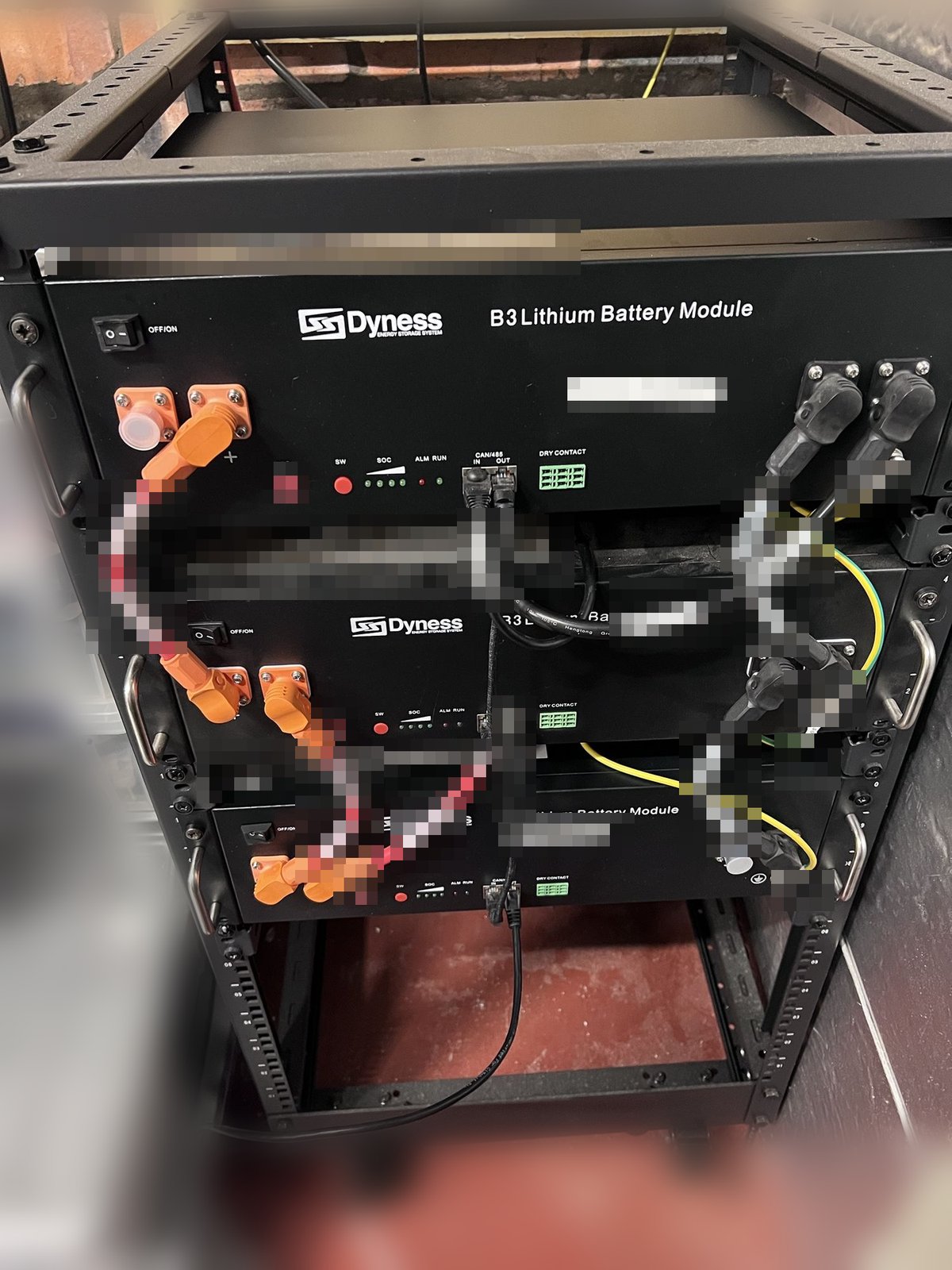
By 22:05 the rack was rebuilt: the new modules at the top and bottom, old module 1 in the middle. CAN and earth went on first, with the DC cables left off. I re-addressed old module 1 to 2 and the other new unit to 3 on their DIP switches.
At 22:07 I pressed the master. Only address 1, the 9.72 kWh new unit at the top, answered. Two things changed. The CAN link cables were in the wrong ports, so I moved them to run OUT to the next module’s IN. The slaves still stayed silent until their rockers were on and I’d pressed each one’s red SW button by hand. I don’t know which of the two fixed it.
At 22:12 all three were on the bus with 0 errors, and the stack frames showed 3 modules and 225 Ah. Resting voltages were 49.45 V and 49.39 V for the new modules and 48.51 V for the old one. The old one was lower only because it had just been discharged and hadn’t rested; all three read 32 %.
Closing the DC links
At 22:21 the DC cables and the inverter leads went on with every module off, and then the modules were powered up. The equalising current was small: each new module pushed about 4.5 A into the old one, which took 8.5 A, and the voltages were within 0.1 V of each other in seconds.
At 22:22 I started the service, and it logged HEALTHY with 3/3 modules OK and every alert evaluated and off. At 22:25 the PV isolator and then the AC isolator went back on. It was dark, so the panels had nothing to add. The inverter went green and drew 12.5 A from the stack, shared across all three modules.
Final layout
| CAN address | Rack position | Unit | Connections |
|---|---|---|---|
| 1 (master) | Top | New, 9.72 kWh | Inverter CAN lead into IN; inverter negative on its spare − terminal |
| 2 | Middle | Old module 1, 1052 cycles, SOH 97 % | Daisy chain only |
| 3 | Bottom | New, 9.62 kWh | Pi CAN lead from OUT; inverter positive on its spare + terminal |
The inverter’s DC is connected diagonally: positive from one end of the stack and negative from the other. That gives every module the same total cable length to the inverter, which helps the current share evenly.
What I learned
A stack with no master looks like a wiring fault
Thousands of bit-stuffing errors a second and no data frames is exactly what a bad cable or missing termination looks like. Unplugging modules didn’t change it; setting one module to master fixed it instantly.
If a Dyness B3 bus suddenly fills with error frames when you add a module, check that one module is set as master before you start replacing cables.
Match SOC before paralleling, and read it from the bus
Reading each module’s own SOC and voltage over CAN made it easy to bring the kept module down to the new modules’ shipping charge of 32 %, rather than guessing from a terminal voltage.
Resting voltage isn’t SOC
At the same 32 %, the old module read about 0.9 V below the new ones, because it had been under load minutes earlier. The equalising current after paralleling was about 8.5 A in total and died away in seconds.
Lifetime kWh tells identical modules apart
Two new modules look the same and both report about 2 cycles. Their lifetime energy didn’t match, 9.62 kWh against 9.72 kWh, and that figure can’t go down, so it worked as a fingerprint.
Note each new module’s lifetime kWh as soon as it’s on the bus. It’s the easiest way to tell which one you’re looking at later.
Byte 4, bit 3 of 0x24 means “not on the DC bus”
The first new module’s raw flags were:
1
2
3
0000030008000000
byte 2 = 0x03   DisMOS_on, ChgMOS_on
byte 4 = 0x08   bit 3, not in the flag table
The old stack had never shown that bit. It was set on every module that was powered but not paralleled, including old module 1 once it was back in the rack before the DC links went on, and it cleared on all three the instant the DC links closed. The service’s decoder doesn’t name it, but it keeps all 8 bytes in flags_raw, which is the only reason the bit was visible at all. It’s worth adding to the protocol spec.
Slaves may need their own button pressed
Pressing the master’s switch shut all the slaves down. On power-up they didn’t come back until I pressed their own SW buttons. The link cables were also in the wrong ports at first, so I can’t say which of the two was the problem, or whether slaves normally start with the master.
Module numbers are CAN addresses, not rack positions
Home Assistant names modules by CAN address. The old module 1 is now address 2, so its history carries on as module 2, and modules 1 and 3 now show about 2 cycles.
Listen-only probing next to the live service is safe
SocketCAN lets the service and the probe read the same bus at once, and because the probe used the service’s own decoder, the numbers on my terminal matched the dashboard.
What a failing module looks like on the wire
Each faulty module had one cell about 160 mV below its siblings under load, an SOC estimate that drifted (13 % at the same voltage as its neighbours, an hour after reading 41 %), and a BMS that disabled discharge. All of that was visible over CAN well before the inverter complained.
What’s next
- Master firmware. The question to Dyness about whether a new module should be master, given firmware versions, is still unanswered. A new module is master for now.
- Old module 1. It is now CAN address 2 in the middle of the rack, and its cell 7 is on watch. If it goes the way of the other two, Dyness have said they will replace it.
- Collection. The two old modules are waiting for Dyness to collect them.
I wrote this post with help from AI tools (Claude, Codex). I review, edit and check everything before publishing. How I use AI